In this article, you’ll learn how to add self-hosted runner capacity safely and why ephemeral runners are usually easier to trust than cloned machines. That matters because durable engineering comes from understanding trade-offs, not merely reproducing a command or pattern.
Adding more GitHub Self-Hosted Runners
To help build out our numbers of GitHub Self-Hosted Runner, we took a shortcut and had cloned an existing Linux VM.
Unfortunately, the by-product of doing this resulted in (a) the clonee (source) Linux VM had their Self-Hosted hijacked by the new VM and (b) we had a Runner registered in GitHub that didn’t actually have a running runner - Offline 🤪.
Madness!
Ok, so what to do?…
These are the steps I worked thru to rectify this:
- Firstly, remove Runner off of the new VM
- Next, rerun the
config.shstep on new VM - Finally, restart to Runner service on Clonee VM
First, let’s deal with the New VM
First of all, we need to remove the correct Runner service so I ran:
sudo systemctl | grep runner
...
sudo systemctl  | grep runner
  actions.runner.<org>.<hostname>.service                                                loaded active
I then copied the above service (actions.runner.<org>.<hostname>.service) name into clipboard and past in below (<service-name>)
systemctl stop <service-name>
systemctl disable <service-name>
Next, I returned to the GitHub portal and navigated to the Runners page and selected the new Runner. What I’m aiming to do here is to get a token that I can use to remove the Runner from the new VM:

I pressed the Remove button
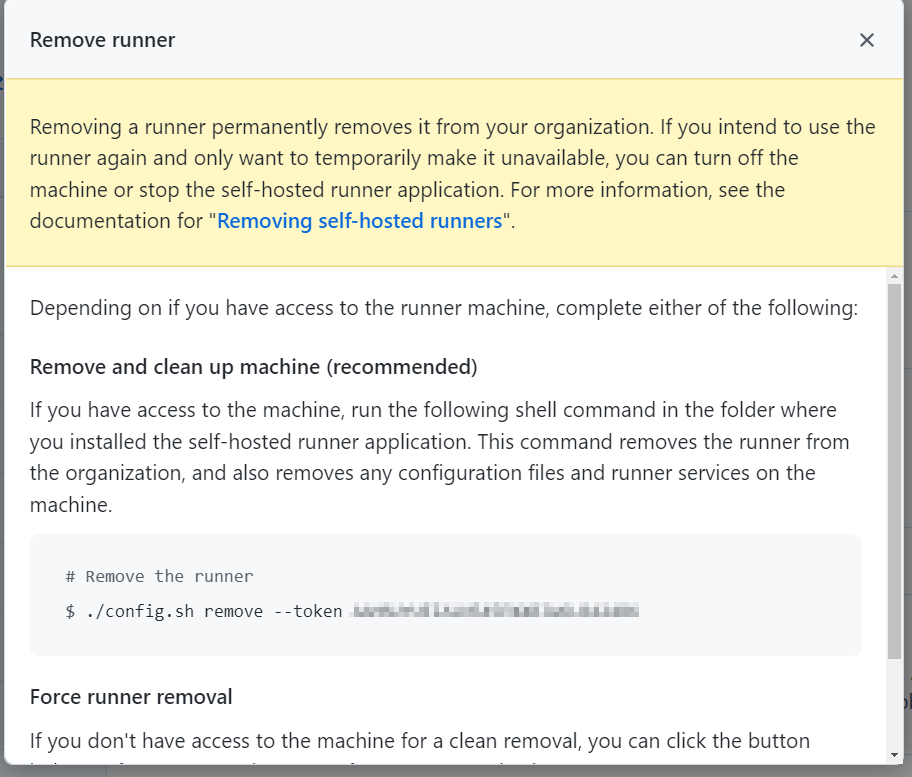
then copied and executed this on the new VM:
./config.sh remove --token <redacted>I re-ran the config.sh by:
./config.sh --url https://github.com/<org> --token <redacted>
sudo ./svc.sh install
sudo ./svc.sh start
At this point I saw the Self-Hosted Runner return to the GitHub Runners page - Showing as Idle and not as Offline.
Bring the Clonee back online
At this point, I could now longer see the Clonee’s hostname in the list of Runners.
I returned to the Clonee VM and ran:
cd actions-runners
sudo ./svc.sh start
This restarts the Runner as a service. It then became visible in the GitHub Runners page.
Deepening the article
Prefer replacement over cloning
A runner installation contains registration state, credentials, work directories, logs, and tool caches. Cloning a registered VM can duplicate identity and leak job residue. Provision a fresh machine from an image, install the runner, and register each instance with its own short-lived registration token.
Self-hosted runners are not clean by default between jobs. For repositories that can receive untrusted pull requests, a persistent runner is a serious execution boundary: workflow code can inspect the host and attempt to persist. Use runner groups, restrict repository access, minimise permissions, isolate networks, and prefer ephemeral just-in-time runners that are destroyed after one job.
At scale, GitHub recommends Actions Runner Controller for Kubernetes-based autoscaling. Whether using ARC or VMs, forward diagnostic logs before destroying ephemeral instances, keep the runner application and base image updated, and monitor queued jobs so a missing label does not remain invisible until timeout.
The original “clonee” procedure may recover capacity in a controlled lab, but it should not become the production pattern. Infrastructure as code plus immutable images makes replacement testable and removes the need to preserve a runner as a pet.
References
Closing thought
A self-hosted runner is safest when it is cheap to replace, narrowly trusted, and never allowed to become the long-lived memory of jobs it once executed.