In this article, you’ll learn how process failure, container restart policies, and orchestration each cover a different part of Node.js resilience. That distinction matters because cloud failures usually emerge at the seams between configuration, identity, networking, and operations.
If by accident to deploy a solution using the Node.js Cluster API and do not fork exited processes then the following docker-compose restart_policy will not help you:
deploy:
    restart_policy:
        condition: on-failure
If you’re using the Cluster API to schedule tasks across your processes, and all forked processes die, then the docker engine will just assume you’ve gracefully shutdown.
Take this code for example, you will see that it doesn’t fork another process and therefore, at some point it will no longer process any anything:
import { Injectable } from '@nestjs/common';
import * as cluster from 'cluster';
import * as os from 'os'

@Injectable()
export class ClusterService {

    static clusterize(numCPUs: number, callback: () => void): void {

        if (cluster.isMaster ) {

            const procs = (numCPUs > os.cpus().length) ? os.cpus().length : numCPUs

            console.log(`GOING TO USE ${procs} PROCESSES`)
            console.log(`MASTER SERVER (${process.pid}) IS RUNNING `);
            console.log(`MASTER SERVER (${process.pid}) IS RUNNING `);
            console.log(`SCHED_NONE: ${cluster.SCHED_NONE}`)
            console.log(`SCHED_RR: ${cluster.SCHED_RR}`)
            console.log(`CLUSTER SCHEDULING POLICY: ${cluster.schedulingPolicy}`)

            for (let i = 0; i < procs; i++) {
                const worker = cluster.fork();
                console.log(`CREATING PROCESS ${worker.process.pid}`);
            }

            cluster.on('exit', (worker, code, signal) => {
                console.log(`worker ${worker.process.pid} died ${signal || code}`);
            });

            cluster.on('disconnect', (worker) => {
                console.log(`worker ${worker.process.pid} disconnected`);
            })

        } else {
            callback()
        }
    }
}
To mitigate this, you simply fork another process within the exit event handler like this:
cluster.on('exit', (worker, code, signal) => {
    console.log(`worker ${worker.process.pid} died ${signal || code}, restarting...`);
    const newWorker = cluster.fork();
    console.log(`CREATING PROCESS ${newWorker.process.pid}`);
});
To avoid the container not restarting due to lack of process availability to deal with demand in the above scenario, you can’t use the on-failure condition in the restart_policy. You must use the ‘any’ condition. This section incidentally replaces the old restart sub-option.
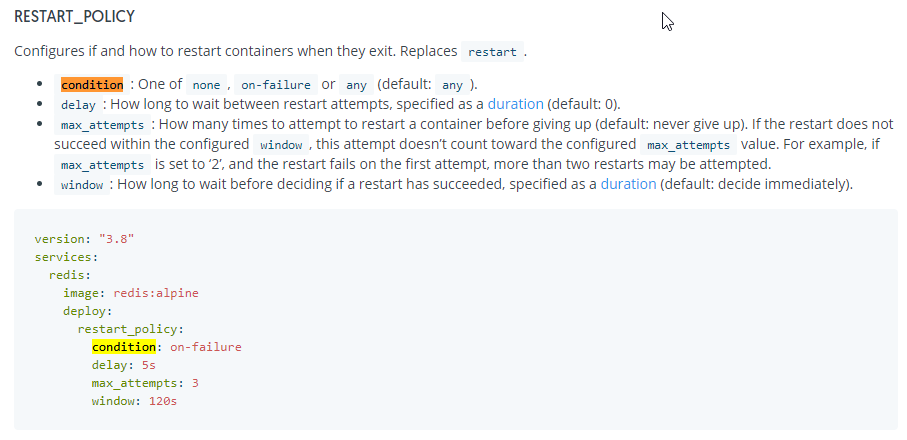
deploy:
    replicas: 1
    resources:
        limits:
            cpus: "2"
            memory: 512M
    update_config:
        order: start-first
        parallelism: 1
    restart_policy:
        condition: any
        delay: 5s
        window: 120s
    placement:
        constraints:
- node.role == workerCaution: You can’t use max_attempts: 3 in combination with condition: any
Additionally, I found one further interesting facts when looking into this issue.
If you’re using Docker Stack Deploy (think stack in Portainer) using a docker-compose file to deploy to your swarm and you’re using restart: always, then beware, the restart is not supported.
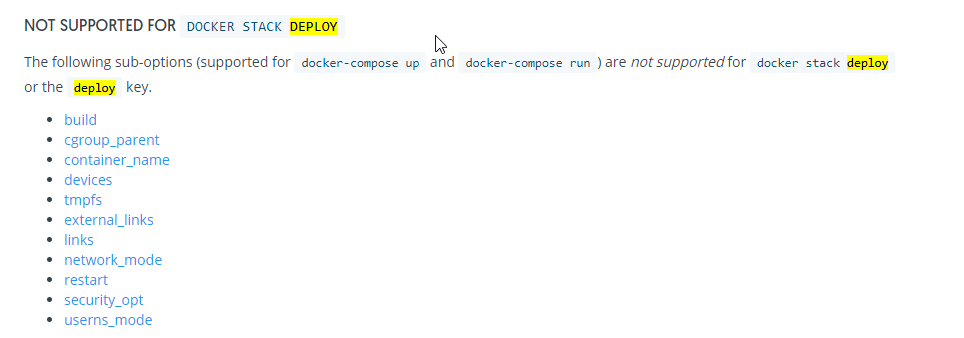
ref: 👆 compose-file
2026 technical review
Technical review: separate three failure domains
Node’s cluster module can run multiple worker processes, but it is not a container restart policy and it does not recover a failed host. A container runtime restart policy can restart a terminated container on one machine. An orchestrator adds desired state, scheduling, health checks, rollout, and replacement across machines. Choose each layer for a distinct failure boundary.
Run one application concern per container and handle SIGTERM: stop accepting new work, complete bounded in-flight operations, close resources, and exit before the grace period. Do not catch uncaught exceptions merely to keep serving from potentially inconsistent process state; log the failure safely, let the process terminate, and rely on supervised replacement.
A restart loop is not resilience. Add readiness, backoff, resource limits, externalised state, and telemetry that reveals why the process exited. Test graceful shutdown and dependency failure rather than assuming a restart flag proves recovery.
References
Closing thought
A restart policy can bring a Node.js process back; resilience is whether the surrounding system remains correct while that process disappears and returns.