Two certificates, ten MCP servers: getting Entra client-credential auth right
If you run agentic integrations — SaaS platforms like ElevenLabs or Amelia calling into your Model Context Protocol servers — you are, whether you framed it this way or not, running a machine-to-machine identity estate. This article walks the full design: rotation policy reality, certificate-based client credentials, the resource/client split, and the surprisingly small number of credentials the whole thing needs.
First, the rotation question that started it
This began with a governance puzzle. Deploy the Azure Landing Zones reference implementation — portal accelerator or the AVM pattern module — and its Key Vault guardrails initiative (Enforce-Guardrails-KeyVault) arrives with firm opinions: every secret must carry an expiration date, and a deny-effect policy caps maximum validity at 90 days. Alongside it sits a second, easily misread parameter: a pre-expiry threshold (typically 30 days) that flags or denies anything drifting close to its expiry date. Teams see “30 days” and conclude they must rotate monthly. They don’t — that parameter is a runway, not a cadence. It’s saying “finish your rotation at least 30 days before the old credential dies”: outage insurance, not extra aggression. The number that actually governs lifetime is the 90-day ceiling.
Is 90 days best practice, then? Microsoft’s broader guidance (the Cloud Security Benchmark and the Well-Architected Framework’s security pillar) doesn’t prescribe a universal figure — 90 days for high-value secrets is the commonly cited baseline, with a hard ceiling of around two years on any credential’s lifetime. What ALZ does is turn that baseline into a deny-by-default starting position: deliberately opinionated, fully parameterised, and shipped on the expectation that you tune it consciously rather than inherit it accidentally. There’s method in the strictness, too — a 90-day cap with a deny effect makes manual secret management painful enough that teams either automate rotation properly or move to credentials that don’t need rotating at all.
Because here’s the uncomfortable truth from enough of these programmes: automation maturity matters more than the number. A rotation cycle that depends on humans raising tickets produces shortcuts, secrets pasted into chat threads, and expiry outages — a worse posture than a longer cycle that runs itself. A shorter interval buys a smaller compromise window; automation buys consistency.
And there’s a trap hiding in the tooling: a Key Vault rotation policy governs secret objects stored in the vault. It does not reach into Microsoft Entra ID and rotate an app registration’s client secret at its source. If a copy of that secret lives in Key Vault, rotating the vault object achieves nothing unless something also mints a new credential on the app registration (via Microsoft Graph) and writes it back. That “something” is a scheduled Function App, Logic App or Automation runbook you have to build — there is no out-of-box automatic rotation for client secrets.
| Credential | Sensible cadence | Why |
|---|---|---|
| KV secrets | ≤90 days (ALZ guardrail) | The ALZ initiative denies longer validity and flags anything within ~30 days of expiry. Sustainable only with end-to-end automated rotation — tune the parameters deliberately if your automation isn’t there yet. |
| App reg client secrets | 90–180 days, 2-year max | Directly usable if leaked; the portal caps at 2 years and Microsoft recommends rotating well inside that. Enforce tenant-wide with application management policies in Graph. |
| App reg certificates | 6–12 months | Compromise requires stealing a private key from the holder’s infrastructure, not intercepting a string. Overlapping certs make rotation zero-downtime. |
| Managed identity / federation | Never — nothing exists | The best rotation policy is having nothing to rotate. |
Which brings us to the real recommendation: for production machine-to-machine auth, stop fighting the secret-rotation battle and switch weapons.
Certificates, and the golden rule that changes everything
The fundamental weakness of a client secret is that it must travel. You generate a string in the portal and transmit it to the vendor — it exists in an email, a Teams message, a password-vault export. The trust boundary is broken the moment it leaves you.
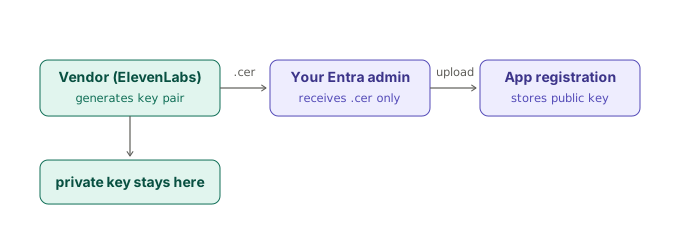
Certificate credentials invert the direction of the exchange, and this is the single most important idea in the whole design:
The golden rule: you never send anyone a private key. The party that will authenticate generates the key pair, keeps the private key in its own custody, and sends you only the public certificate. A public cert is not sensitive — you could publish it on a billboard.
So the vendor — say ElevenLabs — generates a public/private key pair in their own infrastructure (ideally an HSM or their own vault), keeps the private key where it was born, and sends you a .cer file. You upload it to the relevant app registration under Certificates & secrets, Entra records its thumbprint, and provisioning is done. Nothing secret ever moved.
Where the cert gets generated (and where it doesn’t)
One thing that catches people out: the app registration cannot generate a certificate. Open Certificates & secrets on any app registration and the Certificates tab offers only an upload button. Generation happens elsewhere, in order of preference:
- The vendor’s own infrastructure — the gold standard above. If a vendor can’t generate a key pair, that itself tells you something about how they’d custody one.
- Azure Key Vault — generate a self-signed certificate there, download the
.cerfor the app registration, and hand the vendor the.pfxvia a one-time-secret channel. Workable, but the private key has now travelled — exactly what certificates were meant to avoid. - OpenSSL —
openssl req -x509 -newkey rsa:2048 -keyout key.pem -out cert.pem -days 365 -nodes. Fine for dev; least governed for production.
And a fact that surprises almost everyone: Entra does not validate the certificate chain or require a CA-issued cert for app registrations. It performs a simple thumbprint-and-signature match, so self-signed certificates are perfectly acceptable and standard practice here.
Rotation, revisited for certificates
Twelve months is the common baseline, six in higher-assurance environments — a far more relaxed conversation than secrets, because the risk profile differs: a leaked secret is directly usable by anyone; compromising cert auth means stealing a private key from the vendor’s estate. Better still, rotation is zero-downtime by design: an app registration holds multiple certificates simultaneously, so the vendor sends a new .cer, you upload it alongside the old one, they cut over at their leisure, and only then do you delete the old cert. No coordinated change window, no 2 a.m. cutover.
What the vendor actually does at runtime
The certificate is never sent with requests. Instead the vendor’s client builds a short-lived JWT — the client assertion — containing its client ID, the token endpoint as audience and an expiry of a few minutes, signs it with the private key, and posts it to your tenant’s token endpoint with grant_type=client_credentials and client_assertion_type=urn:ietf:params:oauth:client-assertion-type:jwt-bearer. Entra verifies the signature against the public cert you uploaded (matched by thumbprint) and issues an access token scoped to the target MCP server’s API.
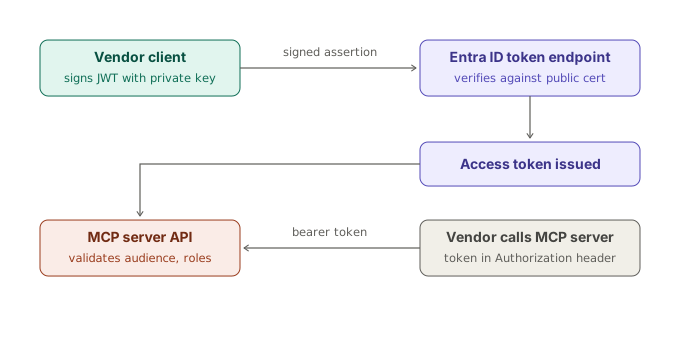
In practice nobody hand-rolls the assertion — MSAL does it in one line:
// .NET — MSAL handles the signed-assertion dance
var app = ConfidentialClientApplicationBuilder
    .Create(clientId)
    .WithCertificate(certificate)
    .WithAuthority($"https://login.microsoftonline.com/{tenantId}")
    .Build();

var result = await app
    .AcquireTokenForClient(new[] { "api://mcp-docs.contoso.com/.default" })
    .ExecuteAsync();
# Python — MSAL handles the signed-assertion dance
import msal
app = msal.ConfidentialClientApplication(
client_id=client_id,
authority=f"https://login.microsoftonline.com/{tenant_id}",
client_credential={
"private_key": open("private_key.pem").read(),
"thumbprint": "1234567890ABCDEF1234567890ABCDEF12345678",
},
)
result = app.acquire_token_for_client(
scopes=["api://mcp-docs.contoso.com/.default"]
)
if "access_token" in result:
token = result["access_token"]
else:
raise RuntimeError(f"{result.get('error')}: {result.get('error_description')}")The resource side: expose an API, define app roles
Each MCP server gets its own app registration — that part is non-negotiable best practice. Each one exposes an API and defines its own app roles, reflecting that server’s specific tool surface and risk profile. Setting one up is a four-step job:
- Set the Application ID URI under Expose an API. The default
api://{client-id}works, but a human-readable URI likeapi://mcp-orders.contoso.compays for itself the first time you’re staring at a token’saudclaim in a log. This URI becomes the audience of every token issued for this server. - Define app roles with Allowed member types = Applications. Resist a single generic “Access” role if the server exposes tools with different blast radii — tier them (
Tools.ReadvsTools.Execute,Docs.SearchvsDocs.Fetch). - Grant roles to the vendor’s client app via API permissions → My APIs → Application permissions — then click Grant admin consent. Application permissions always require it; forget this and token requests succeed with an empty roles claim, producing the classic “auth works but everything’s 403” mystery.
- Enforce on the server. Entra issues the token; checking it is your job — validate issuer, signature, audience, and require the role.
One distinction that trips nearly everyone: the Scopes section on Expose an API is for delegated, user-present flows. For client credentials — daemon-to-API, no user — scopes are irrelevant; app roles carry the authorisation. Daemon clients can’t consent to scopes; they’re granted roles.
"appRoles": [
  {
    "id": "b6e2f7a1-3c4d-4e5f-9a8b-1c2d3e4f5a6b",
    "allowedMemberTypes": [ "Application" ],
    "displayName": "Tools.Read",
    "description": "Invoke read-only MCP tools (list, query, fetch)",
    "value": "Tools.Read",
    "isEnabled": true
  },
  {
    "id": "c7f3a8b2-4d5e-4f6a-8b9c-2d3e4f5a6b7c",
    "allowedMemberTypes": [ "Application" ],
    "displayName": "Tools.Execute",
    "description": "Invoke state-changing MCP tools",
    "value": "Tools.Execute",
    "isEnabled": true
  }
]
And the enforcement side in ASP.NET Core with Microsoft.Identity.Web:
builder.Services.AddAuthentication(JwtBearerDefaults.AuthenticationScheme)
    .AddMicrosoftIdentityWebApi(builder.Configuration.GetSection("AzureAd"));

builder.Services.AddAuthorization(options =>
{
    options.AddPolicy("ToolsRead",
        policy => policy.RequireRole("Tools.Read"));
});
Two validation points people miss. Always check the audience — without it, a token obtained for MCP server 3 would be accepted by MCP server 7, quietly collapsing your per-server authorisation model. And for defence in depth, consider validating azp/appid (the calling client) against an allow-list on high-privilege servers.
Ten servers, two vendors — and the trap to avoid
Here’s where instinct leads people astray. Ten MCP server registrations, two vendors — surely that’s a credential per vendor per server? Twenty certificates?
No. The ten MCP registrations are resources. ElevenLabs and Amelia are clients. Give each vendor one client app registration of their own, then grant that single identity the application permissions (app roles) on whichever of the ten servers it’s allowed to reach. ElevenLabs holds one private key, requests a token per target API, and each MCP server validates audience and roles on the way in.
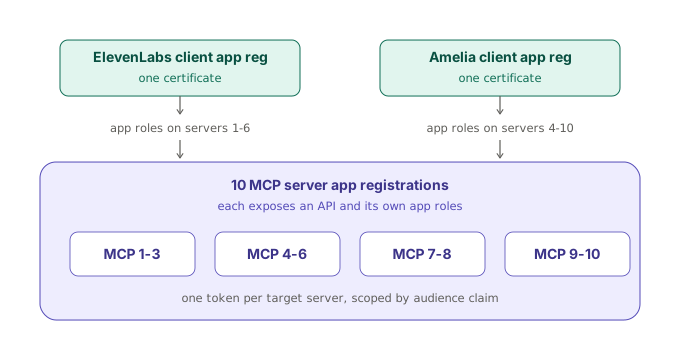
The per-vendor-per-server alternative gives you 20 registrations and 20 certificates today, scaling as vendors × servers — vendor three takes you to 30, and rotation burden, expiry monitoring and offboarding runbooks scale with it. Per-vendor identity scales linearly, and revoking a vendor entirely is one credential deletion. The only cases for splitting a vendor across multiple client registrations: regulatory or contractual isolation between workloads; vendor products calling from genuinely separate infrastructures with separate key custody; or an extremely high-privilege server where you want an independently revocable circuit breaker. Exceptions to justify case-by-case — not the default.
One certificate, many tokens: the passport and the visas
The reason one cert composes cleanly with ten differently-shaped role sets is that authentication and authorisation are orthogonal — they vary independently, like the axes on a graph; moving along one doesn’t move you along the other.
The certificate answers exactly one question: who is calling? Think of it as a passport — it proves the caller is ElevenLabs and says nothing about what they may do. App role assignments answer the second question: what may this caller do, and where? Those are the visas — records in Entra, entirely separate from the certificate, one set per server. The two meet only at the token endpoint: ElevenLabs requests a token naming a specific server (scope=api://mcp-docs.contoso.com/.default); Entra verifies the signature against the one certificate, looks up the role assignments for that server, and mints a token whose aud is that server and whose roles claim contains only that server’s grants.
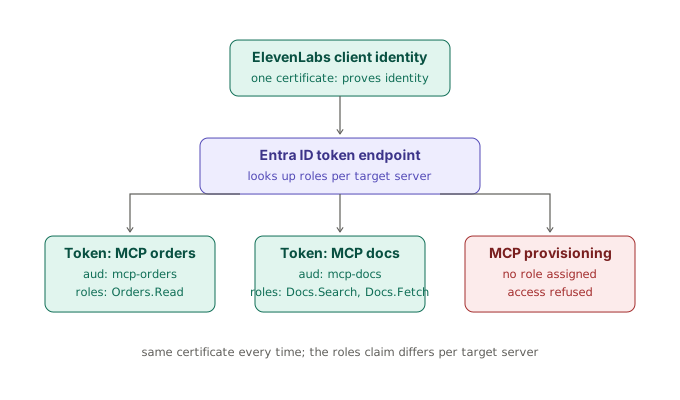
The independence is the operational payoff. Rotate the certificate tomorrow — new key pair, new .cer — and not a single role assignment changes. Grant Orders.Submit, revoke Docs.Fetch, cut a vendor off from server 6 entirely — the certificate is untouched, no vendor coordination needed, effective on their next token request. Contrast this with the API-key world, where the key often is both the identity and the permission set — which is exactly why API keys are painful. Entra deliberately splits the two, and this architecture exploits the split: minimal credentials to protect, maximal granularity in what they authorise.
Where the certificates actually live
The clean rule underneath it all: credentials belong only to things that authenticate. The ten MCP server registrations are resources — they expose an API, define roles, and receive tokens. They never call the token endpoint and never prove their identity to anyone, so they hold zero certificates and zero secrets. Their Certificates & secrets blades should be completely empty; in fact, an empty credentials blade on a resource registration is a hygiene signal, and a cert appearing on one is worth investigating.
2, not 20. Total certificates for the whole estate — one per vendor, regardless of whether you run 10 MCP servers or 50. Adding a server adds a registration and some grant rows: zero new credentials. Onboarding vendor three adds exactly one.
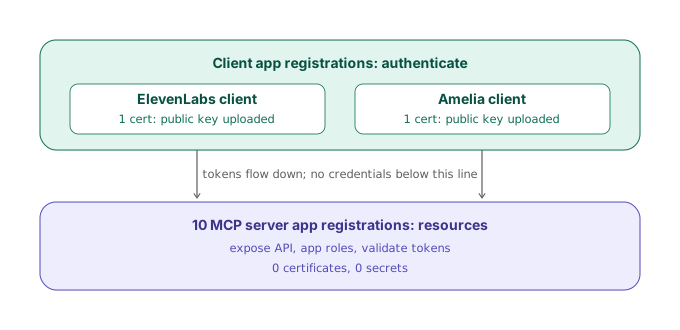
If the MCP servers themselves call onwards — Graph, SQL, storage — resist giving them a credential for that either. Running on Azure compute (App Service, Container Apps, AKS), they use their managed identity for outbound calls. The invariant stays beautifully clean: the only key material anywhere is the two private keys held by the vendors, in their own custody, for their own identity. Everything you operate is credential-free.
Ship the trust fabric as code
Ten servers × bespoke roles × two-plus vendors is a matrix, and portal-clicking a matrix is how drift and mystery 403s happen. The whole design reduces to a plain map — vendor → server → [roles] — that generates the grant assignments. One code review shows the entire trust fabric; one terraform plan shows any drift. A useful implementation detail: consent in the portal is really just a friendly workflow for creating app role assignments on the service principals — in Terraform or Graph you create those assignments directly and skip the declare-then-consent dance entirely.
# The trust fabric as data — one reviewable document
variable "grant_matrix" {
  default = {
    elevenlabs = {
      mcp-orders = ["Orders.Read"]
      mcp-docs   = ["Docs.Search", "Docs.Fetch"]
    }
    amelia = {
      mcp-docs         = ["Docs.Search"]
      mcp-provisioning = ["Provisioning.Execute"]
    }
  }
}

# Flattened into azuread_app_role_assignment resources:
# vendor service principal → role id → server service principal
Round it out with governance: a quarterly access review on the vendor enterprise applications (“does ElevenLabs still need Docs.Fetch?”) keeps the footprint honest — Entra ID Governance can automate the cycle if your licensing includes it — and Entra sign-in logs filtered on the vendor service principals give you a full audit trail of every token issued.
The one honest caveat
Check what each vendor actually supports before designing around this. Plenty of SaaS platforms only offer a “client ID + client secret” text box and can’t do certificate-based authentication at all. If a vendor falls into that camp, the pragmatic options are: accept a secret for that integration with a tight rotation policy and sign-in-log monitoring, or put Azure API Management in front of the MCP servers — the vendor authenticates to APIM with whatever they support, while APIM uses managed identity onwards, and you gain throttling, logging and a single revocation point in the bargain. A quick support ticket to each vendor before committing to the architecture is cheap insurance.
Takeaways
- Rotation cadence matters less than rotation automation. A four-week Key Vault policy is defensible only when no human is in the loop — and it never reaches app registration credentials, which need their own mechanism.
- Certificates beat secrets because the private key never travels. The vendor generates the pair; you receive only the public
.cer. Self-signed is fine — Entra matches thumbprints, not chains. - Every MCP server gets its own app registration, Application ID URI and bespoke app roles — but resource registrations hold zero credentials. Credentials belong only to things that authenticate.
- One client identity per vendor. Authentication (the passport) and authorisation (the visas) are orthogonal: one certificate, many differently-scoped tokens, each carrying only that server’s roles in its claim.
- Always validate the audience on every MCP server, and require the role — or the per-server model silently collapses.
- Express the
vendor → server → rolesmatrix as code, review it quarterly, and treat every remaining client secret as technical debt to be replaced by certificates, managed identity or workload identity federation.
The endgame, always, is fewer credentials: managed identities for anything running in Azure, workload identity federation for external workloads that can hold an OIDC trust, certificates where a credential is genuinely unavoidable, and secrets only where a vendor’s capability forces your hand. Two certificates, ten servers, zero secrets — and a rotation policy conversation that finally got shorter instead of longer.
Technical details reflect Microsoft Entra ID and Azure Key Vault behaviour as of mid-2026 — verify against current Microsoft Learn documentation before implementation.